Password Policies
CMP Converged Monetisation Platform. The MDS Global product that supports customer care and billing for digital service providers. 8 supports restricting reuse of previous passwords and defining password pattern policies. These can be enabled and configured through the Identity Server Management Console.
Set Password History Policy
-
Log into the Identity Server Management Console.
The console opens on the Home page. By default, the Main menu tab is selected.
-
In the Identity section of the tab, locate Identity Providers and click Resident.
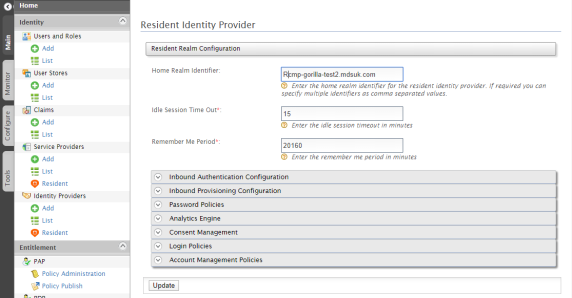
- In the Resident Identity Provider screen, expand Password Policies > Password History.
-
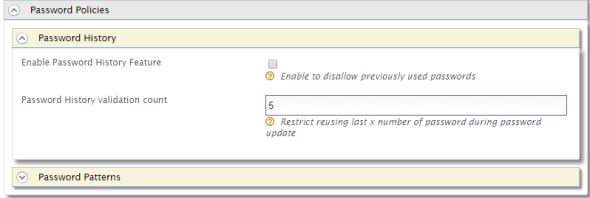
You can Enable Password History Feature and enter a Password History validation count.
-
Click Update.
A success message is displayed.
Set Password Patterns Policy
-
Log into the Identity Server Management Console.
The console opens on the Home page. By default, the Main menu tab is selected.
-
In the Identity section of the tab, locate Identity Providers and click Resident.
- In the Resident Identity Provider screen, expand Password Policies > Password Patterns.
-
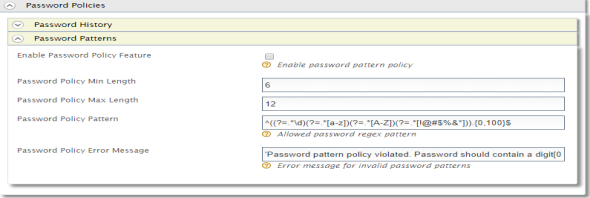
To define a password pattern policy, you can:
- Enable Password Policy Feature
- Enter a Password Policy Min Length
- Enter a Password Policy Max Length
- Specify a Password Policy Pattern
- Define a Policy Error Message for when a user A person with the capability to log in to the CMP GUI software, such as a customer service advisor or agent. enters a password that doesn't meet the policy requirements .
-
Click Update.
A success message is displayed.